


Something fundamental has changed in how people discover content online. The change is not loud. There is no big platform migration or overnight traffic collapse. But it is already affecting how traffic is classified, interpreted, and explained.
We are already seeing this show up quietly across GA4 accounts, usually in places teams are not actively reviewing.
AI-powered browsers and assistants like ChatGPT, Copilot and Perplexity are now part of the discovery path. They summarize answers and reference relevant websites where appropriate. Understanding AI impact on web traffic is vital for marketers and business as more users turn to these platforms for discovery and decision making.
What This Traffic Actually Looks Like in GA4 Today
In most implementations, AI-driven visits do not show up as Organic Search. They also rarely get their own clean channel grouping. They get folded into Referral alongside everything from partner links to random blogs.
You will typically see:
- Source values like chatgpt.com or perplexity.ai.
- Medium almost always set to referral.
- Sessions often mixed into a long tail of other referrals.
- Engagement patterns that do not match traditional referral behavior.
From a technical standpoint, that is correct. From a decision-making standpoint, it creates confusion.
Referral traffic has historically meant “someone linked to us.” AI browser traffic is different.
The user did not discover your site because a publisher chose to link to you. They discovered it because an AI system summarized options, answered a question, and then a user decided your page was worth clicking.
Why This Matters More Than It First Appears
When AI browser traffic is lumped into Referral, a few things tend to happen:
- Early AI-driven growth goes unnoticed.
- Changes in Organic traffic can get misinterpreted.
- Leaders assume performance shifts are campaign-driven when they are not.
Small numbers today turn into big interpretation problems later. By the time it is obvious, the narrative has already drifted.
This is where we see teams lose confidence in their reporting, not because the data is wrong, but because the story no longer lines up with what they are observing in the business.
How to Actually See AI Browser Traffic in GA4
You do not need new tracking, tagging, or engineering work to do this. You just need to look at GA4 a little differently than most teams do today.
Step 1. Start with Source and Medium, not channels
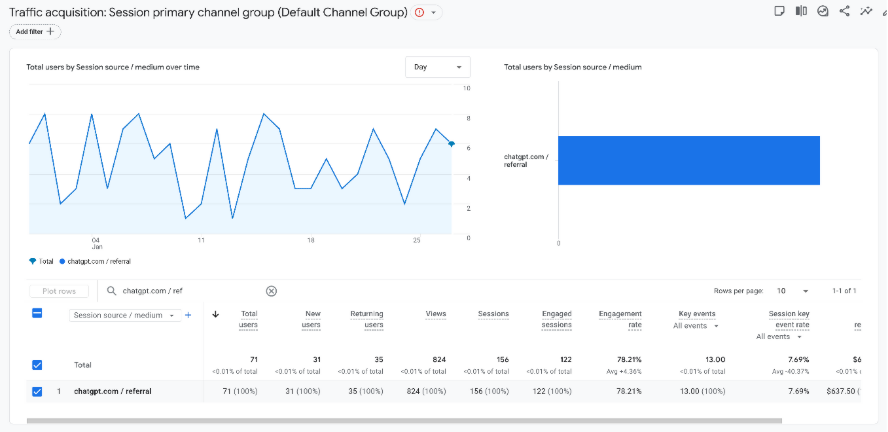
In GA4:
- Go to Reports.
- Open Acquisition.
- Click Traffic Acquisition.
- Change the primary dimension to Source and Medium.
This view shows you how GA4 is truly classifying visits, before they are rolled up into high-level buckets.
Step 2. Look for AI Sources Explicitly
Once you are in Source and Medium, scan the source column for names you do not usually pay attention to.
Common ones today include:
- chatgpt.com
- Perplexity.ai
- Gemini
- Copilot
- comet or other AI browser domains as they emerge
In most cases, you will see:
- Source = chatgpt.com or perplexity.ai
- Medium = referral
If you do not see them immediately, use the search bar in the table and type “chat” or “perplex”.
Even small volumes are worth noting. Growth usually shows up quietly before it becomes obvious.
Step 3. Sanity Check Engagement, Not Just Sessions
Click into those AI sources and compare engagement rate, average engagement time, key events or conversions to other referrals and to Organic Search. AI-driven visitors often arrive more informed or sometimes bounce faster because the AI already answered most of their question.
Those differences matter more than raw volume.
Step 4. Identify Which Pages AI Is Sending People To
Next, flip the analysis around.
Create a simple Exploration:
- Dimension = Page path or Page title
- Metric = Sessions or Active Sessions
- Filter = Source contains ChatGPT or perplexity
This shows which content AI tools are choosing to surface and which content is being ignored entirely.
This is one of the fastest ways to understand how AI systems interpret your content.
Step 5. Make It Visible in Ongoing Reporting
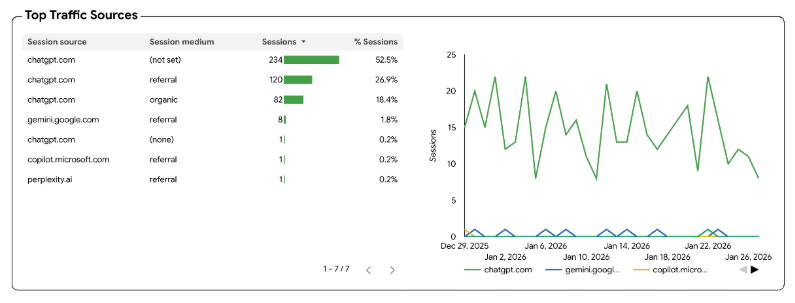
If this analysis lives in a one-off exploration, it will be forgotten.
Instead:
- Add a small table to your monthly reporting that lists AI referral sources.
- Track trend over time, even if the numbers are small.
- Keep it separate from general referral traffic.
Do not over-engineer it. The goal is visibility, not precision.
What You Should and Should Not Conclude
You can safely say:
- AI tools are influencing discovery.
- Some content is being surfaced more than others.
- Engagement patterns differ from traditional referrals.
You should not assume:
- This replaces SEO.
- This is fully attributable.
- This reflects total AI influence, since many AI interactions never result in a click.
GA4 shows you the click. It does not show you the full decision path.
Strategic Implications Beyond Reporting
Once you see this traffic clearly, a few broader considerations come into focus.
Measurement-wise, attribution models that assume discovery starts with search queries become less reliable. The “why” behind the click is now upstream of what analytics can fully capture.
From a content perspective, pages that clearly answer questions, compare options, or explain tradeoffs tend to surface more often in AI tools. Pages built only to rank for keywords may struggle here.
From a spend perspective, changes in Organic or Paid Search performance should be interpreted alongside AI referral trends, not separately. Some traffic is not lost. It is simply taking a different path.
And from a leadership perspective, this is a reminder that dashboards describe behavior. They do not explain influence.
The Real Issue Is Not Classification. It Is Interpretation.
At Solvenna, we see this as less of a tooling problem and more of a reporting and interpretation problem. GA4 is doing what it was designed to do. But the way many teams read it is increasingly out of date.
AI browsers are already part of the customer journey. They just happen to be hiding inside Referral.
Teams that adapt will not be the most technical. They will be the ones willing to look one layer deeper, question old assumptions, and update how they explain performance.
That is the real shift happening now.
Where Solvenna Comes In
If you’re responsible for explaining performance, not just reporting it, this shift matters.
Solvenna works with analytics and marketing teams to modernize GA4 reporting, surface hidden drivers like AI browser traffic, and help leadership trust the story again.
Reach out if you want clarity before this quietly becomes a bigger problem.